Automation
Most teams start AI automation in the wrong place. They pick the flashiest use case, the one that demos well in a board meeting, instead of the one that quietly saves the most money and time. Six weeks later they have an impressive proof of concept that nobody uses, and a lingering sense that "AI didn't work for us."
It almost always did work. It was just pointed at the wrong problem. Here's a simple framework for pointing it at the right one.
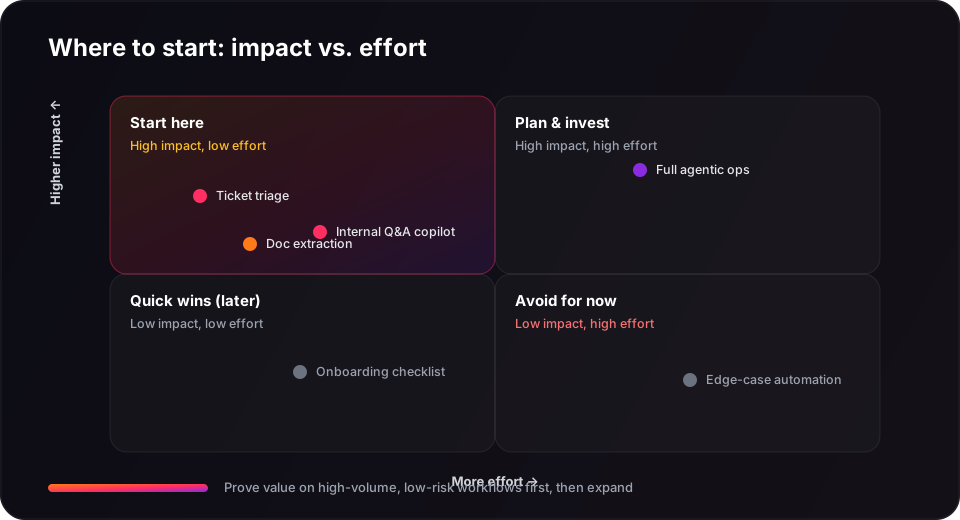
Score workflows on impact and effort
Before automating anything, map your candidate workflows on two axes: how much value automation would create, and how hard it would be to build reliably. The best first projects cluster in one corner.
- High impact, low effort, start here. Repetitive, high-volume work with structured inputs and measurable outcomes.
- High impact, high effort, plan and invest. Worth doing, but only once you've built confidence and infrastructure.
- Low impact, anything, deprioritize. Cool demos that don't move a real number can wait.
What makes a workflow a good first target
The strongest starter candidates share a few traits. The more boxes a workflow ticks, the better:
- Humans repeat the same steps daily. Volume is what turns small time savings into real ROI.
- Inputs are structured or semi-structured. Forms, tickets, and documents are easier to ground than open-ended judgment calls.
- Outcomes are measurable. You can prove it worked, handle time, error rate, hours saved.
- The cost of a mistake is low or recoverable. A human can catch and correct errors before they reach a customer.
The best first projects
| Project | Why it's a strong start |
|---|---|
| Ticket triage & routing | High volume, structured, instantly measurable, low blast radius. |
| Internal Q&A copilot | Saves time across the whole company; mistakes stay internal. |
| Document & data extraction | Structured inputs, clear accuracy metrics, huge manual time sink today. |
| Onboarding checklists | Repetitive and rules-based, easy reliability, quick win. |
What to avoid
- Don't automate edge cases first. The rare, messy 5% is the hardest to get right and the least valuable to start with.
- Don't remove the human too early. For anything customer-facing, keep a person approving output until evals prove reliability.
- Don't skip measurement. If you can't show the before-and-after number, you can't defend the project, or improve it.
- Don't chase autonomy for its own sake. A reliable assistant beats an ambitious agent that's wrong 10% of the time.
Prove value on high-volume, low-risk workflows first. Earn autonomy with evidence, don't assume it.
How we approach it at Appflare
When we run an AI readiness audit, this is essentially the exercise: map the workflows, score them on impact and effort, and pick the one where a reliable, human-in-the-loop system pays for itself fast. That's how our support automation project cut handle time from 12 minutes to 4 and paid back in under three months, by starting in the right corner of the matrix.
If you're not sure which workflow to automate first, book a free AI readiness audit and we'll help you find your highest-ROI starting point.